
To put NXTL eSIM connectivity inside an app, booking platform or internal system, let your backend call the NXTL business API. Keep the API key on the server, tie requests to your own order or assignment, wait for provisioning to finish, and deliver the installation details through your customer journey. A mobile app or browser should not hold the business API secret.
This implementation guide explains the decisions around that architecture. It complements the NXTL API reference, which is the source for current fields, scopes and account-specific limits. NXTL is the publisher; capabilities were reviewed on 16 October 2026. No private credentials or production provisioning requests were used to prepare this guide.
What is an eSIM API integration?
An eSIM API connects your business software to provisioning, line management, usage and billing functions. Your product still owns its own customer account, checkout, entitlement, messages and support workflow. NXTL supplies the documented connectivity operations through an approved business account.
Examples include an airline app adding arrival data, a fintech app offering an eligible travel benefit, a reseller fulfilling a connectivity order and an employer issuing a line after a travel request is approved. Those are applications of the same integration pattern, not evidence of existing NXTL contracts with particular brands.
Design the integration around four components
| Component | Responsibility | What belongs elsewhere |
|---|---|---|
| Your app or website | Customer interface, claim status and installation guidance | Business API keys and webhook secrets belong on your server |
| Your backend | Eligibility, payment/approval state, idempotency, NXTL requests and customer access control | It should not treat an accepted provisioning request as a delivered profile |
| NXTL business API | Documented issuance, lifecycle, usage, balance and event operations | Your retail pricing, customer billing and merchant obligations remain your commercial design |
| Your webhook worker and support tools | Reliable event handling, reconciliation and exception resolution | A webhook alone should not bypass your entitlement or ownership checks |
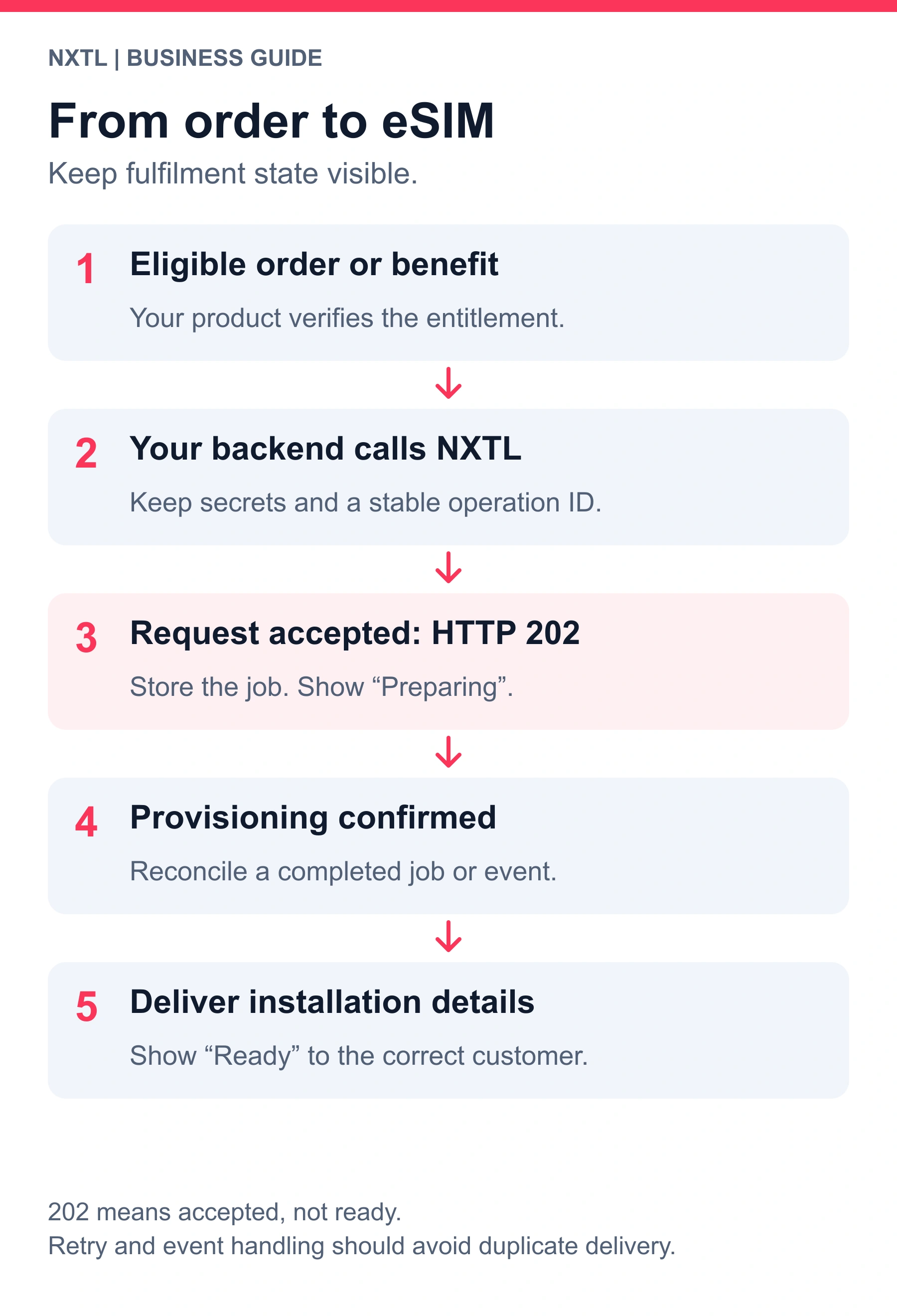
HTTP 202 means accepted work. Deliver the activation result only after confirmed provisioning.
Begin with the account, funding and supported API surface
The published base URL is https://nxtlsim.com/api/v1. Business API access requires approval. The API reference does not currently document a separate public sandbox base URL, so agree a contained pilot and any testing arrangements with NXTL rather than inventing a sandbox hostname.
Confirm the account's scopes, available balance, issuance fees and quotas before a test that can create a paid resource. A public health check proves reachability; it does not prove your key or funding is ready.
curl -sS "https://nxtlsim.com/api/v1/health"
For an approved account, the published authentication header is X-NXTL-Key. Load the secret from your server's secret store. The following is a read-only account check; the placeholder is an environment variable, not a key supplied with this article.
curl -sS
  -H "X-NXTL-Key: $NXTL_KEY"
  "https://nxtlsim.com/api/v1/partner"
Map a customer entitlement before creating a profile
Use your own database to answer: who is eligible, which order or membership funds the benefit, whether that person already has a relevant profile, and which actions support can take. A person pressing a button twice should not produce two purchases merely because two HTTP requests reached your server.
Store at least your internal operation ID, customer or employee reference, provisioning state, NXTL job ID, the issued line identifier when available, and the fulfilment outcome. Use access controls when exposing installation details: knowing a booking reference should not be enough to retrieve another person's QR code.
An existing profile may remain useful for a later supported trip. Design the repeat-customer journey deliberately rather than issuing another profile for every visit by default. Device replacement, a deleted profile and a new assignment are separate cases for your support workflow.
Estimate, request, wait and reconcile
The documented sequence is to check the account, call POST /esims/estimate, request issuance and then inspect the asynchronous result. Take current fees and accepted values from the live reference and account configuration. Treat issuance options and later network-policy settings as distinct operations: use the accepted values for the particular request rather than copying a similarly named field from another endpoint.
A single issuance request is documented at POST /esims. A successful submission returns an asynchronous job, normally HTTP 202. Poll GET /jobs/{id} or consume the relevant completion event. A job being accepted is not a QR code, an installed profile or proof of usable connectivity.
Your customer-visible states can be more helpful than a generic success screen:
- Eligible: the claim or order is valid, but no issuance has been accepted.
- Preparing: an accepted job is waiting or running.
- Ready to install: successful provisioning has been reconciled to the right entitlement.
- Needs attention: the operation failed, funding is insufficient or support must investigate.
These are suggested states for your product, not promised literal NXTL response values. Keep the provider's actual job state separately and map it explicitly.
Use idempotency for the business operation
The API documents Idempotency-Key for issuance, bulk issuance and top-up operations. Make the key stable for the same intended operation, such as one order item. Preserve it on a retry after a timeout. Generate a new operation identity only when you deliberately want a new operation.
Do not retry an uncertain issuance by creating a new key and assuming the first call failed. Record the job or request ID, inspect its result, and reconcile before creating another paid resource. The API documentation describes replay responses with Idempotent-Replayed: true; use this as a diagnostic signal, not as a substitute for your own order record.
Treat a bulk job as a set of individual results
The documented POST /esims/bulk-issue operation supports quantities up to 1,000, subject to account funding, quota and permissions. That limit is not a promise that every business can issue 1,000 lines immediately or receive every profile at the same moment.
Keep a batch reference and a per-line result. A single successful item does not prove that the whole cohort was provisioned. Define how partial success is delivered, which failures can be retried and how support finds the affected people or assets. For an event, that may mean issuing the ready profiles while a coordinator investigates the few exceptions.
Receive webhooks as operational events
Useful events in the current reference include esim.provisioned, esim.provision_failed, usage.recorded, balance.low, balance.exhausted, job.completed and job.failed. Subscribe to the events your workflow needs, and keep delivery logs available to support. The event list also contains lifecycle events for suspension, reactivation, exchange and termination.
NXTL documents a timestamped HMAC-SHA256 signature in X-NXTL-Signature-V1, computed over the timestamp, a period and the raw JSON body. Verify the signature against the raw bytes before trusting parsed fields. Your receiver should also enforce an appropriate timestamp window, deduplicate accepted events and persist work before acknowledging delivery. Those are receiver-design recommendations; validate exact retry and replay behaviour against the current integration contract.
An authenticated event can still be delivered more than once or arrive after your own state changes. Ensure your worker reconciles to the right order and current state. Keep customer delivery idempotent too: a replay must not issue another customer entitlement or send an installation pack repeatedly.
Separate funding, usage charges and your own customer price
Your retail price is not necessarily NXTL's issuance charge, data rate or the amount of company funding you transfer. Maintain those concepts separately in your accounting. Read the current account configuration and API estimate rather than copying a consumer checkout price into a wholesale cost model.
The reference documents GET /balance, GET /balance/history, GET /invoices and GET /quotas. It describes POST /topup as crediting the pool from available prepaid partner budget. Confirm the actual funding arrangement for your account; do not build a customer card-charging feature from the endpoint name alone.
Preserve each amount with its native currency. The reference explains that usage records may contain USD or EUR depending on the profile generation and transaction, and that a converted field can be zero when it is not the native accounting amount. A zero in such a field is not proof that the data was free. Currency display conversion should not silently change ledger meaning.
Give finance, support and operations the views they need
| Need | Documented operation or pattern | Integration decision |
|---|---|---|
| Usage by period | GET /usage/summary and /usage/timeseries |
Define reporting periods and reconcile late-arriving activity |
| Usage by line | GET /usage/esims and /esims/{iccid}/usage |
Map each line to an internal owner or order |
| Itemised activity | GET /usage/cdrs |
Paginate and preserve the amount/currency pair |
| Pause or resume | POST /esims/{iccid}/suspend and /resume |
Control who may act and record the reason |
| Network policy | PATCH /esims/{iccid}/tier |
Use supported values and explain their cost/coverage effect |
| Funding visibility | Balance, ledger, invoices and quotas | Distinguish available budget from revenue or consumed data cost |
| Thresholds | /thresholds, with notification or suspension actions |
Treat as operational controls, not instantaneous guarantees |
Roaming activity may be reported after the actual data transfer. Your product must not promise an exact real-time individual spending ceiling merely because it has a threshold rule. If a customer benefit requires a hard allowance, agree how that promise will be enforced and communicated before launch.
Fit the API to three common journeys
A travel booking add-on
Confirm the booking and the connectivity purchase, create one entitlement, request issuance and record the job. Deliver installation details only after success. Later itinerary changes should prompt a coverage review. A cancelled booking should follow the partner's agreed connectivity cancellation process rather than automatically terminating a line the customer may already be using.
A fintech or membership benefit
Check membership eligibility on your backend, then establish whether the member already has a profile. Keep the claim, sponsored benefit and actual usage funding visible to customer support. Agree how account changes affect future claims. Your app can present the journey under the agreed commercial and branding arrangement without exposing the NXTL business key.
Corporate travel and compatible equipment
Use approved employee or asset references, issue a cohort and inspect every result. Give operations the ability to see usage and apply the supported lifecycle controls. For backup equipment, include a real failover test and device validation in the rollout. Your corporate MDM or device-management platform requires its own integration; the existence of a REST API does not grant silent eSIM installation rights.
Design failure handling before the happy-path launch
Handle invalid or revoked credentials separately from insufficient balance and missing permissions. Retain X-Request-Id for support. Respect rate-limit response headers and use controlled retry/backoff where appropriate. The reference contains both structured and some legacy compact error formats, so keep parsing defensive and treat the HTTP status as meaningful.
Test duplicate submission, a timeout with an uncertain result, a failed provisioning item, a delayed webhook, duplicate event delivery, low balance and partial batch completion. Also test a user trying to view another customer's activation details. These checks establish whether the surrounding product can operate reliably; a successful health request alone does not.
Know which features need a separate agreement
The current public reference does not document a complete live destination/network pricing feed, detailed upstream network diagnostics, a universal installation SDK, private APN or static public IP, guaranteed latencies, or ordinary cellular voice/SMS numbers. Obtain explicit confirmation for anything your use case requires beyond the documented standard data service.
Branded delivery and resale are commercial questions as well as API questions. App-store requirements, supported installation mechanisms and customer-service ownership also belong in the launch plan. Avoid building customer promises around an inferred upstream supplier capability.
Integration questions, answered directly
Can we put NXTL inside our own app?
Yes, an approved business integration can connect your backend to NXTL and present the agreed connectivity journey inside your app. Keep the API secret server-side and use supported installation flows.
Does API access include a public sandbox?
No separate public sandbox base URL is currently documented. Agree testing arrangements and a contained pilot with NXTL.
Can a webhook tell us that a line is ready?
The reference documents provisioning completion and failure events. Reconcile the completed result before delivering activation information; HTTP 202 alone is not delivery confirmation.
Is a business spending threshold a fair-use policy?
No. It is an account owner's chosen control. NXTL's standard metered PAYG service has no usage-based FUP; data use is charged at applicable rates, while network conditions and your chosen rules still affect the experience.
What should we send NXTL before starting?
Describe the customer journey, expected volume, markets, device types, funding model and required operations. Apply for NXTL Business, then agree account and commercial fit before production provisioning. For broader ideas, use the 36 business use cases and the roaming-cost and backup playbook.