Last checked: 7 August 2026
Most travellers can plan around 3–5 GB of mobile data for a seven-day trip to Spain if they mainly use Google Maps, messaging, browsing, social media and occasional music or video. A light user may need only 1–3 GB, while frequent HD video, cloud backups, video meetings or laptop hotspot use can push a one-week trip above 10 GB.
The right amount depends less on whether you are in Barcelona, Mallorca or Tenerife and more on what your phone does in the background. This guide gives realistic planning ranges, shows what typically consumes data, and explains how current pay-as-you-go pricing compares with a fixed Spain bundle.
Quick answer:
Plan around 1–2 GB for a short city break,
3–5 GB for a typical week,
and 5–10 GB for two weeks of moderate use.
Add more when you expect regular video streaming, remote work or hotspotting.
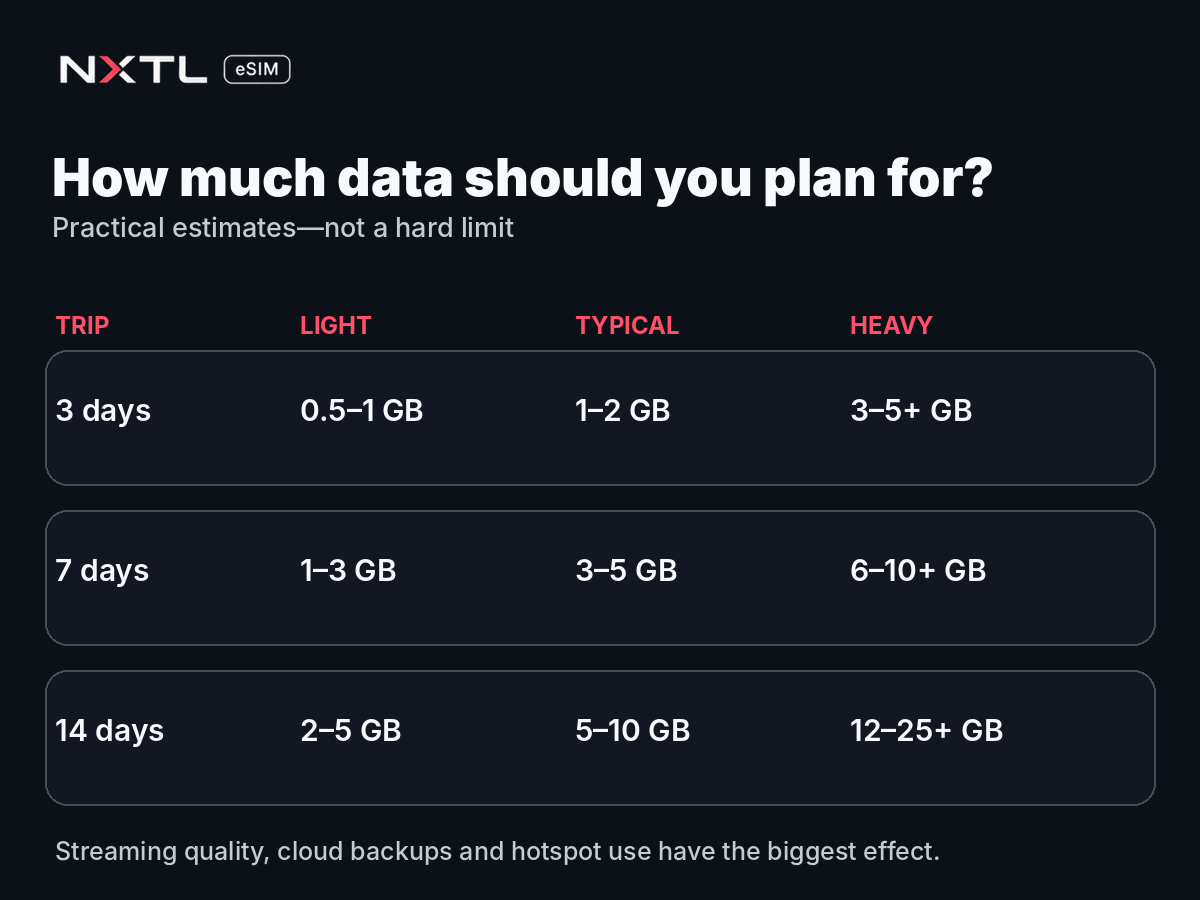
Spain mobile data estimates for 3, 7 and 14 days
These are planning estimates rather than limits. Application quality settings, automatic backups and Wi-Fi availability can move your result substantially.
| Trip length | Light use | Typical use | Heavy use |
|---|---|---|---|
| 3 days | 0.5–1 GB | 1–2 GB | 3–5+ GB |
| 7 days | 1–3 GB | 3–5 GB | 6–10+ GB |
| 14 days | 2–5 GB | 5–10 GB | 12–25+ GB |
Light use
Light use means your phone is mainly a travel tool:
- Google Maps and public-transport directions
- WhatsApp or another messaging application
- Restaurant and attraction searches
- Email and light browsing
- Digital boarding passes and hotel reservations
- Occasional photographs sent to friends
A light traveller can often complete a long weekend with around 1 GB, especially after downloading offline maps and using hotel Wi-Fi for large uploads.
Typical use
Typical use adds daily social media, photo uploads, music and short videos. This is the most useful planning profile for a normal holiday.
For seven days, 3–5 GB gives many travellers comfortable room for navigation, messaging, browsing, ticket applications and moderate entertainment without buying a large allowance that may never be used.
Heavy use
Heavy use includes:
- Frequent TikTok, Instagram Reels or YouTube
- HD or 4K video
- Automatic photo and video backups
- Video meetings
- Laptop or tablet hotspot use
- Uploading long travel videos
- Cloud-based remote work
Ten gigabytes can disappear quickly when a laptop starts synchronising files or a phone uploads an entire camera roll. Heavy users should monitor consumption daily rather than relying on a general holiday estimate.
What uses the most data while travelling in Spain?
The largest difference is usually not Maps versus messaging. It is video and background activity.
The current NXTL pricing guide provides rough activity estimates such as approximately 0.01 GB per hour for Google Maps navigation, around 0.05 GB for a one-hour WhatsApp voice call, roughly 0.1 GB for an hour of music, around 0.5 GB for an hour of standard-definition YouTube and approximately 1.5 GB for an hour of HD YouTube. Real usage varies by application version, quality and device settings.
Google Maps and navigation
Navigation normally uses relatively little data once the map area has loaded. Downloading an offline area before departure reduces data use further and gives you a backup in weak-signal areas.
Maps can use more data when you repeatedly search new locations, load satellite imagery, view photographs and reviews, or recalculate long routes throughout the day.
WhatsApp, Messenger and email
Text messages use very little data. Photographs, large files, voice calls and especially video calls use more.
A week of ordinary messages and occasional voice calls is usually a small part of a 3–5 GB allowance. Group video calls are a different category and should be treated as heavy use.
Instagram, TikTok and video
Short-video feeds are among the easiest ways to consume gigabytes without noticing. Applications preload the next clips, and higher connection speeds can encourage higher playback quality.
Someone watching video for an hour each day may use more data than another traveller uses for maps, messages and browsing during the entire trip.
Photo and cloud backup
Uploading selected photographs is manageable. Automatically backing up every photograph and 4K video can be extremely expensive in data terms.
Before travelling, set Google Photos, iCloud Photos, OneDrive or another cloud service to back up only on Wi-Fi—or pause backup completely until you reach a trusted connection.
Hotspot and remote work
A laptop can trigger:
- Operating-system and application updates
- Cloud-drive synchronisation
- Email attachment downloads
- Browser tab refreshes
- Video-conferencing traffic
- Automatic photo-library uploads
Hotspotting is useful, but it should be treated as laptop data usage rather than phone data usage. A remote worker should generally plan for substantially more than a sightseeing traveller.
How much data do you need in Barcelona or Madrid?
A Barcelona or Madrid city break is usually dominated by:
- Walking and public-transport directions
- Attraction tickets and opening times
- Restaurant searches
- Messaging
- Ride-hailing or taxi applications
- Translation
- Photo uploads
For a three- or four-day city break, 1–2 GB is a sensible starting estimate for a typical traveller who uses hotel Wi-Fi for video and large backups. Around 3 GB gives more room for regular social media and music.
You do not need a huge bundle simply because the city is large. Maps and ticket applications are relatively efficient. The main risk is background video and cloud activity.
How much data do you need in Mallorca, Ibiza or the Canary Islands?
Island trips often create a slightly different pattern.
You may use more navigation while driving, upload more photographs and videos, depend less on hotel Wi-Fi during day trips, and move through rural or coastal areas where one network performs differently from another.
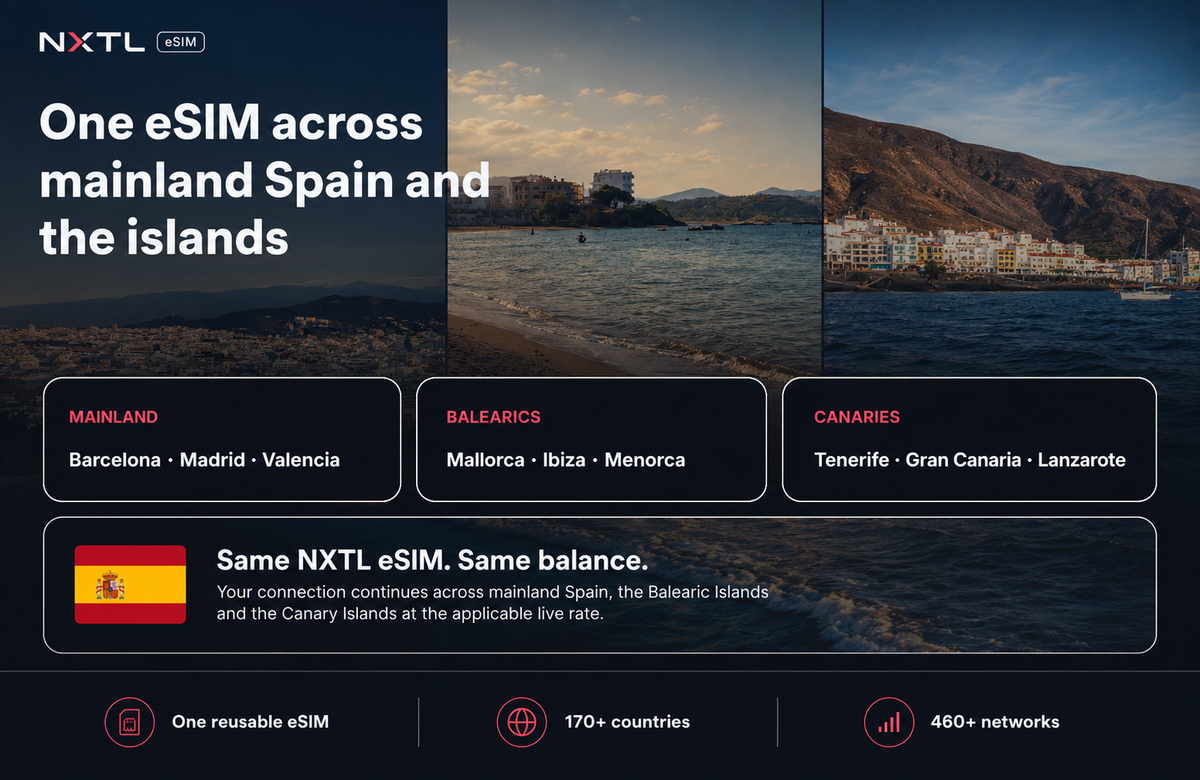
A seven-day island holiday still often fits within 3–5 GB for typical use, but consider 5–10 GB when you plan to:
- Navigate by car every day
- Upload many high-resolution photographs
- Stream music for long drives
- Watch video away from Wi-Fi
- Work from a laptop
- Share data with another device
Mainland Spain, the Balearic Islands and the Canary Islands use the same Spanish national mobile market. With NXTL, the same installed eSIM and account balance can continue across these destinations; you do not need a separate Mallorca or Tenerife eSIM profile.
Local coverage can still vary by town, building, beach or mountain route, so having access to several available networks is more useful than assuming one operator will be strongest everywhere.
Is 5 GB enough for one week in Spain?
Yes, 5 GB is enough for many travellers spending one week in Spain, provided they mainly use navigation, messaging, browsing, social media, email, photo uploads, music and occasional video.
Five gigabytes may not be enough when you:
- Watch HD video every day
- Use TikTok or Reels for long periods
- Automatically back up all photographs and videos
- Hotspot a laptop regularly
- Attend frequent video meetings
- Share the connection with several devices
The safest approach is to use a realistic estimate and monitor actual consumption. Buying 20 GB “just in case” can waste money when most of the allowance expires unused.
What would 1, 3, 5 or 10 GB cost with NXTL in Spain?
At the time of checking, the lowest NXTL Spain rate was approximately $0.71 per GB. The exact amount depends on the selected network and live exchange conversion.
| Data used | Approximate NXTL usage cost |
|---|---|
| 1 GB | $0.71 |
| 3 GB | $2.15 |
| 5 GB | $3.58 |
| 10 GB | $7.17 |
| 20 GB | $14.35 |
These figures describe data usage cost, not the first checkout total. The reusable NXTL eSIM currently costs $11.99 and includes $10 usable account credit. That credit can fund Spain usage, and anything left remains available for another destination.
Check the live Spain eSIM rates and cost calculator before travelling because prices can change by network.
NXTL pay-as-you-go versus a fixed Spain bundle
A price comparison is useful only when the products are explained honestly.
On 7 August 2026:
- NXTL’s estimated usage cost for 5 GB at the lowest current Spain rate was approximately $3.58
- Saily listed a fixed 5 GB / 30-day Spain bundle for $10.16
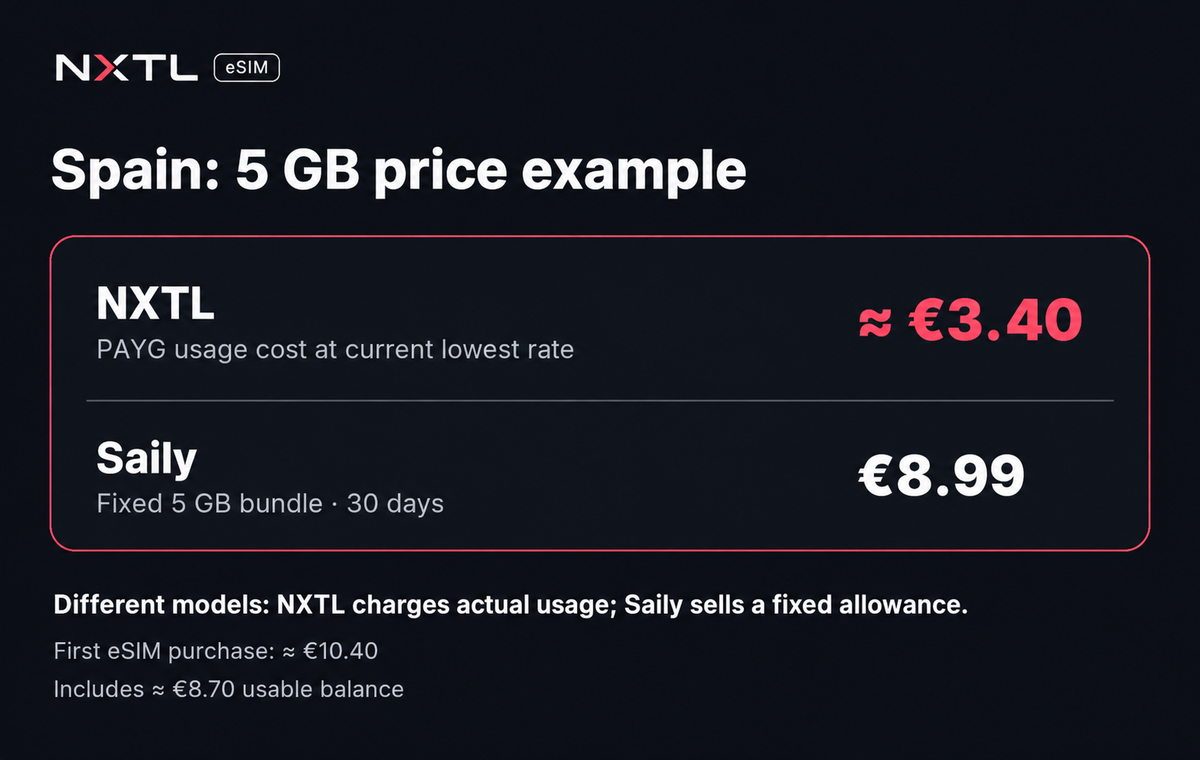
This does not mean the checkout experience is identical.
NXTL
- First eSIM purchase: $11.99
- Includes $10 usable credit
- Charges according to actual usage
- Standard account balance does not expire
- Same eSIM and balance continue into other covered destinations
- Several available networks can have different prices
- Data-only service
Saily
- Fixed 5 GB allowance
- 30-day validity for the cited plan
- $10.16 at the time checked
- Simple one-off bundle presentation
- Additional built-in security and travel features are part of its product
- Unused country-plan data is governed by the plan validity
NXTL is particularly compelling for a traveller who expects to use only a few gigabytes, travels repeatedly, visits several countries, or wants a permanent backup eSIM.
A fixed bundle may feel simpler to a traveller who wants one clearly defined allowance and does not care about retaining unused value. A high-volume or unlimited plan may also suit someone who expects heavy daily streaming.
How to reduce mobile data use in Spain
1. Download offline maps
Save Barcelona, Madrid, Mallorca, Tenerife or your driving region before departure. Offline maps reduce usage and continue working when coverage is weak.
2. Disable automatic cloud backup
Pause iCloud Photos, Google Photos, OneDrive and similar services on mobile data.
3. Turn off automatic application updates
Large updates can consume gigabytes. Allow them only on Wi-Fi.
4. Reduce video quality
Select standard definition rather than HD or 4K. Disable video autoplay where possible.
5. Use hotel Wi-Fi for large tasks
System updates, long video uploads and full photo backups are better completed over trusted Wi-Fi.
6. Restrict unnecessary applications
Both iPhone and Android let you review mobile-data usage and prevent selected applications from using cellular data.
7. Keep your home SIM for SMS
NXTL is data-only. You can keep your normal SIM active for calls, SMS and bank verification codes while selecting NXTL as the mobile-data line. Check your home operator’s roaming charges before making or answering traditional calls.
8. Install before flying
Install the eSIM while you have stable Wi-Fi. After landing, enable the line, select it for mobile data and turn on data roaming for the NXTL profile.
For detailed instructions, use the NXTL eSIM setup guide.
A sensible Spain data plan by traveller type
Weekend city break
Plan: 1–2 GB
Best for maps, tickets, messaging, restaurant searches and moderate social use.
Typical seven-day holiday
Plan: 3–5 GB
Best for daily navigation, social media, photographs, email, music and occasional video.
Two-week sightseeing trip
Plan: 5–10 GB
Best for frequent navigation, social posting and occasional streaming across several cities or islands.
Remote worker
Plan: 10–25+ GB
Actual needs depend heavily on video meetings, hotspotting and cloud synchronisation.
Heavy streamer
Plan: 20 GB or an appropriate high-volume/unlimited alternative
Compare a PAYG estimate with current fixed and unlimited plans before buying. NXTL is not automatically the cheapest option for every heavy-usage scenario.
Spain travel-data checklist
Before departure:
- 1. Confirm that your phone is unlocked and eSIM-compatible.
- 2. Install the eSIM over Wi-Fi.
- 3. Download offline maps.
- 4. Disable mobile cloud backup and automatic updates.
- 5. Keep your normal SIM active if you need SMS or bank codes.
- 6. Set NXTL as the mobile-data line after landing.
- 7. Enable data roaming for the NXTL eSIM.
- 8. Check the live Spain network rates.
- 9. Review data usage during the first day.
- 10. Switch networks manually only when price or local performance makes it useful.
Frequently asked questions
Is 3 GB enough for one week in Spain?
Three gigabytes can be enough for a light traveller using maps, messaging, browsing and limited social media. A typical user who uploads photographs and watches some video should plan closer to 5 GB.
Is 5 GB enough for Barcelona?
Yes. Five gigabytes is usually comfortable for a week of navigation, messaging, browsing, tickets, social media and occasional entertainment. Heavy daily video can exceed it.
Does the same eSIM work in Mallorca and Tenerife?
The NXTL global eSIM can continue working in covered Spanish destinations, including mainland Spain, the Balearic Islands and the Canary Islands, using the same account balance. Check the live Spain network table before travel.
Can I use hotspot with an eSIM in Spain?
Hotspot use generally depends on the device and connected network. NXTL does not impose a separate blanket hotspot ban, but a laptop can consume data much faster than a phone.
Should I install my Spain eSIM before flying?
Yes. Installation is easiest over stable Wi-Fi before departure. Enable the eSIM for mobile data after landing.
Can I keep receiving SMS on my normal number?
Yes, on a dual-SIM phone you can keep the home SIM active while using NXTL for data. Your normal operator may still charge for calls or other roaming activity.
Does unused NXTL balance expire after Spain?
Standard NXTL account balance does not expire. The remaining value can be used on a future trip or in another covered destination.
Final recommendation
For a normal one-week Spain holiday, start with a planning estimate of 3–5 GB. That covers the activities most travellers genuinely need while leaving room for social use and occasional entertainment.
Do not buy 20 GB automatically. First consider whether you will actually stream video, hotspot a laptop or back up large files over mobile data.
NXTL’s current Spain rates make light and moderate usage particularly competitive, while its reusable eSIM and non-expiring balance remove the pressure to consume a bundle before a deadline.
Check live Spain pricing, networks and your estimated trip cost.